Combine EKS Support
Combine supports integrating AWS EKS into an emulated Region. Because of limitations in the AWS EKS architecture, there are several issues to be aware of when you stand up your EKS Cluster.
- To configure EKS managed add-ons, see Combine EKS Add-Ons.
- For a complete working example of an EKS Cluster in Combine, see the Combine EKS example repository.
- To run Combine itself on an EKS Cluster, see Configure Combine on EKS.
Kubernetes Version
Combine enforces which Kubernetes versions are supported in each emulated Partition. Combine rejects a CreateCluster or UpdateClusterVersion request with an unsupported version with an InvalidParameterException (unsupported Kubernetes version <version>) and raises an Alert Event. If a CreateCluster request does not specify a version, Combine sets it to the emulated Partition's default version.
As of Combine 3.14.7:
| Emulated Partition | Partition ID | Supported Versions | Default Version |
|---|---|---|---|
| US Top Secret Partition (C2S) | aws-iso | 1.31, 1.32, 1.33, 1.34, 1.35, 1.36 | 1.36 |
| US Secret Partition (SC2S) | aws-iso-b | 1.31, 1.32, 1.33, 1.34, 1.35, 1.36 | 1.36 |
| US GovCloud | aws-us-gov | 1.32, 1.33, 1.34, 1.35 | 1.35 |
| EUSC | aws-eusc | 1.33, 1.34, 1.35 | 1.35 |
Combine and OIDC
Combine supports EKS OIDC integration without rewriting calls to the OIDC provider. The commercial URL that AWS provides works as-is.
You typically create the necessary IAM Roles with the WLDEVELOPER role. The OIDC provider itself must be created by the government customer on the high side. In Combine, you can simulate the government customer with the WLCUSTOMER-IT role (or an equivalent outside role).
WLCUSTOMER-IT grants permissions that are normally reserved for U.S. Government customers, so you can make those requests yourself. It operates outside the Combine emulation boundary.
NOTE: Use WLCUSTOMER-IT only to simulate actions reserved for the government customer. It is not intended for development.
Security Group
Combine proxies traffic from clients to your EKS Cluster, so it must have access to the EKS API.
If your Cluster is open to all traffic within the VPC, no change is needed. Otherwise, at a minimum, give the Combine Endpoint Server Security Group access on your Cluster's Security Group. The Endpoint Server Security Group is named <VpcName>-SG-Endpoints, which is Combine-SG-Endpoints by default.
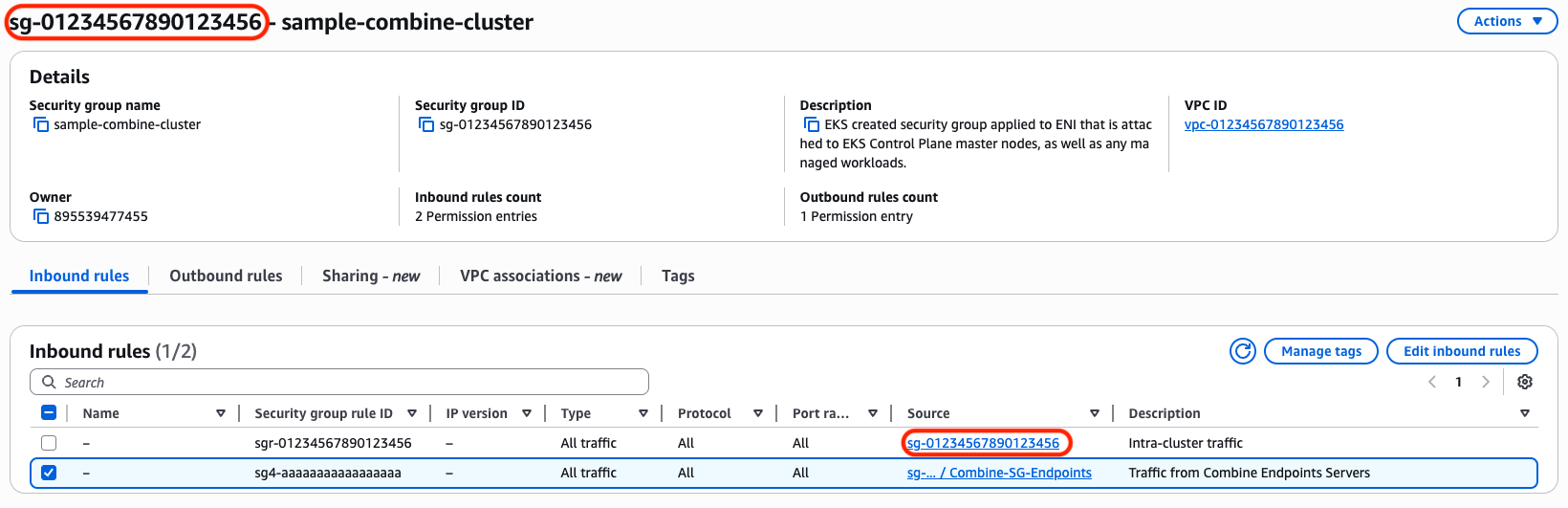
In the screenshot, the Source of the first rule in the EKS Cluster's Security Group references the Security Group itself. Add a rule like the second rule, which references the Endpoint Server Security Group.
Nodes Joining the Cluster
If your Nodes cannot join the Cluster, try the following:
- Make sure the
EnableAirgapAccessEKSCloudFormation Parameter on the Combine VPC Stack (thecombine-vpc.yamltemplate) is set totrue(the default). The Nodes need it to communicate with the Cluster's API server. The API server lives in AWS's network space, outside of the VPC, so Combine cannot proxy that traffic over the high side endpoints. (See Reference - clients.json.) - More suggestions forthcoming.
AWS EBS CSI Driver
Recommended EBS CSI Driver Configuration
Use a recent AWS EBS CSI Driver version and make sure IMDS is reachable from Pods:
- Use version 1.33 or later of the AWS EBS CSI Driver. Newer versions, such as 1.53, are fine.
- On the worker Nodes, enable IMDS and set the HTTP PUT response hop limit to
2or more. - Give the CSI controller credentials through either:
- The Node IAM Role (IMDS)
- IRSA (if supported and configured)
- Do not assume that an IMDS-related error is an emulation limitation.
With this configuration, you can provision dynamic EBS-backed PersistentVolumes in emulated EKS Clusters.
PersistentVolumeClaims Stuck in Pending
If PersistentVolumeClaims (PVCs) stay in Pending when you use the AWS EBS CSI Driver, Pods most likely cannot reach the EC2 Instance Metadata Service (IMDS), which prevents the EBS CSI Driver from obtaining credentials. The root cause is usually an incorrect IMDS hop limit.
When you deploy the AWS EBS CSI Driver in an EKS Cluster in an emulated Region, you may see these symptoms:
- PVCs remain in
Pendingwith messages like:Waiting for first consumerExternalProvisioning
- Logs show errors such as:
GetInstanceIdentityDocumenttiming outfailed to refresh cached credentialsno EC2 IMDS role found
The misconfiguration is an IMDS HTTP PUT response hop limit of 1. The HTTP PUT response hop limit is a setting in the instance metadata options of EC2 Instances, including EKS worker Nodes. It controls how many network hops a response from IMDS can take. Pods need a hop limit of at least 2 to reach IMDS from within the Node network namespace. For more information, see ModifyInstanceMetadataOptions in the Amazon EC2 API Reference.
Once you increase the hop limit to 2 on the worker Nodes, Pods should be able to access IMDS and retrieve credentials, and PVCs should be bound as expected.
Cluster Autoscaler (and Other Component) AZ/Topology Rewrites
AWS Cluster Autoscaler cannot map Kubernetes Nodes to their Auto Scaling Groups in a Combine environment. Combine rewrites the Availability Zone to ISO form in AWS API responses, but a Node's spec.providerID keeps the commercial AZ. The autoscaler Pod retrieves this value from the default Kubernetes domain name kubernetes.default.svc, and this API call does not go through Combine. The autoscaler joins those two values as strings, so they never match.
Reproducing the Mismatch
These two commands reproduce the mismatch in a running Cluster:
# these two commands will reproduce the az/topology mismatch
kubectl get nodes -o custom-columns='NAME:.metadata.name,PROVIDER:.spec.providerID'

aws autoscaling describe-auto-scaling-groups \
  --auto-scaling-group-names <asg> \
  --query 'AutoScalingGroups[].[AutoScalingGroupName,Instances[].[InstanceId,AvailabilityZone]]'
In practice, they return values like these:
[ec2-user@ip-10-0-35-207 not-a-kubestronaut]$ kubectl get nodes -o custom-columns='NAME:.metadata.name,PROVIDER:.spec.providerID'
NAME                          PROVIDER
ip-10-0-36-249.ec2.internal   aws:///us-east-1c/i-0502afe1f135ab04c  💣 <-- bad cause commercial
ip-10-0-40-23.ec2.internal    aws:///us-east-1c/i-05efda15056a6f86a
[ec2-user@ip-10-0-35-207 not-a-kubestronaut]$ aws autoscaling describe-auto-scaling-groups \
  --auto-scaling-group-names \
    eks-combine-master-eks-ng-2-20260611172448052600000007-4ecf5bdb-87be-ad95-f634-b84acd83c998 \
    eks-combine-master-eks-ng-2-20260611174930015800000007-6ccf5be6-d643-7366-b9e8-871ee0cadeda \
  --query 'AutoScalingGroups[].[AutoScalingGroupName,Instances[].[InstanceId,AvailabilityZone]]'
[
  [
    "eks-combine-master-eks-ng-2-20260611172448052600000007-4ecf5bdb-87be-ad95-f634-b84acd83c998",
    [
      [
        "i-0502afe1f135ab04c",
        "us-iso-east-1c" 💣 <-- bad cause iso
      ]
    ]
  ],
  [
    "eks-combine-master-eks-ng-2-20260611174930015800000007-6ccf5be6-d643-7366-b9e8-871ee0cadeda",
    [
      [
        "i-05efda15056a6f86a",
        "us-iso-east-1c"
      ]
    ]
  ]
]
NOTE: This example shows the default rewrite, not the autoscaler's traffic. The aws autoscaling command above runs under your own shell identity (your role and an aws-cli/... user-agent), which is never exempted. It shows what any non-exempt caller receives, and it keeps returning us-iso-east-1c even after you apply the fix below. Do not use it to validate the fix (see Verifying the Fix). The cluster-autoscaler itself never shells out to aws. It uses the AWS Go SDK under its own IRSA role and cluster-autoscaler user-agent, and only that traffic is exempted.
Exempting the Cluster Autoscaler
To fix the mismatch, disable the autoscaling Availability Zone response Rewriter for the cluster-autoscaler. Its DescribeAutoScalingGroups responses then pass through with the commercial AZ intact and match the Node's spec.providerID.
Set these two Configuration Values in the Combine Configuration table (see Edit Combine Configuration Values). The first scopes the exemption by the caller's assumed-role ARN, and the second by the caller's user-agent:
combine.endpoints.aws.rewriter.response.autoscaling.availabilityZone.enable.roleArn.contains.except=cluster-autoscaler
combine.endpoints.aws.rewriter.response.autoscaling.availabilityZone.enable.userAgents.except=cluster-autoscaler
Each value is a space-separated list, matched as a case-sensitive substring against the corresponding request attribute. A request skips the autoscaling AZ rewrite if either:
- its assumed-role ARN contains a listed value (for example,
arn:aws:sts::<account>:assumed-role/PROJECT_cluster-autoscaler/...containscluster-autoscaler), or - its
user-agentheader contains a listed value (for example,aws-sdk-go-v2/... cluster-autoscaler/1.35.0 ...containscluster-autoscaler).
The two Configuration Values are independent. The role ARN condition matches the autoscaler's identity regardless of user-agent, and the user-agent condition matches the autoscaler's requests regardless of role. Both are true for the cluster-autoscaler, so setting both gives a redundant exemption.
NOTE: These Configuration Values are not the request-side combine.endpoints.aws.rewriter.request.strictMode.userAgents.except. That Configuration Value only controls request-side strict-mode validation and has no effect on whether response Availability Zones are rewritten. Combine still rewrites the response AZs of a request with the cluster-autoscaler user-agent to ISO form unless one of the response.autoscaling.availabilityZone.enable.*.except keys above matches.
This targeted exemption gives up full, always-on emulation for the cluster-autoscaler so that it can map Nodes to their Auto Scaling Groups as expected. It is scoped to the autoscaler only. All other clients in the environment continue to receive emulated ISO Availability Zones.
Verifying the Fix
Do not validate the fix with a manual aws autoscaling call. As noted above, that identity is never exempted and still returns us-iso-east-1c. Validate against the autoscaler's own Combine transaction instead.
The autoscaler issues its tag-filtered DescribeAutoScalingGroups call automatically on its scan interval (about every 10 seconds), so a fresh transaction appears on its own. To force one immediately, restart the autoscaler:
kubectl rollout restart deployment/cluster-autoscaler -n kube-system
Then find that transaction in the Combine Log (see View Combine Logs). Confirm that it belongs to the autoscaler by its identity:
- user-agent contains
cluster-autoscaler/...(for example,aws-sdk-go-v2/... cluster-autoscaler/1.35.0 ...) - roleArn contains
...assumed-role/PROJECT_cluster-autoscaler/... - parameters show
Action=DescribeAutoScalingGroupswith thek8s.io/cluster-autoscaler/enabledtag filter
Two signals in that transaction confirm that the exemption applied:
- The AZ Rewriter is skipped. Combine logs a
Response Rewriting : Body : Applying Rewriter [...]line for each Rewriter it runs. When the exemption works,ApiResponseRewriterAutoscalingAvailabilityZoneis absent from that list. You still seeApiResponseRewriterAutoscalingArn, which is a separate Rewriter that is intentionally left enabled. - The client-facing response carries commercial AZs. Compare the two response sections in the transaction:
responseProxy(the raw reply from AWS) andresponse(what Combine returns to the autoscaler). With the exemption active,responseshowsus-east-1c/us-east-1a,b,c, matchingresponseProxy, instead of the rewrittenus-iso-east-1c.
If Combine logs at the VERBOSE level (see Log Level) and the combine.endpoints.log.ignore.api.handlers.disabled Configuration Value is false (it defaults to true), you also see API Handler [...ApiResponseRewriterAutoscalingAvailabilityZone] is disabled for .... That line depends on logging configuration, so rely on the two signals above.
If a fresh autoscaler transaction still shows us-iso-east-1c and the AZ Rewriter still appears in the Applying Rewriter list, the Configuration Value did not reach the Rewriter. Check that the value is set in the Combine Configuration table at the correct environment/partition scope and has propagated, rather than looking for a logic error.
Additional Considerations
- We recommend that you provision your EKS Clusters with Infrastructure as Code (IaC). Clusters built by hand in the AWS Console ("ClickOps") have been shown to not be reliably reproducible, and the AWS Console offers options in the AWS Commercial and AWS GovCloud Partitions that are not present in the emulated Regions.
- Combine does not fully support EKS Clusters provisioned with the TerraForm AWS EKS module version 21.3.1. We anticipate supporting it soon.
- You may need to modify the Helm Chart for some plugins, particularly for AWS Commercial ARNs, Regions, and Availability Zones.
- Your Combine Deployment must have Permissions Boundaries and IAM Self Service enabled. If you are not sure whether they are enabled on your account, email the Combine Support Team.
- You must prefix every IAM Role that does EKS-related work (node groups, Pods, Clusters) with
PROJECT_, as the customer's high side requirement specifies. Combine does not allow you to create roles that do not follow this format.