Combine EKS Support
Combine has support for integrating AWS EKS into an emulated region. However, due to limitations of the AWS EKS architecture, there are a several issues to be aware of when standing up your EKS cluster.
Mention Combine running on EKS here?
Kubernetes Version
Combine enforces which Kubernetes Version are supported in the production environment.
Combine and OIDC
Combine supports EKS OIDC integration without rewriting calls to the OIDC provider — the commercial URL provided by AWS works as-is.
Typically, users employ the WLDEVELOPER role to create the necessary roles. The OIDC provider itself must be created by the government customer on the high side. In Combine, the government customer can be simulated by using the WLCUSTOMER-IT role (or an equivalent outside role).
WLCUSTOMER-IT grants permissions normally reserved for U.S. Government customers, allowing self-service requests and clarifying that it operates outside the Combine emulation boundary.
NOTE that WLCUSTOMER-IT is only for use in simulating actions reserved for the government customer, and not intended for development.
Security Group
Since Combine is proxying traffic from clients to your EKS cluster it must be granted access to the EKS API.
If your Cluster is open to all traffic within the VPC this is not necessary. If not, at a minimum you will need to give the Combine Endpoint Server Security Group access on your Cluster's Security Group.
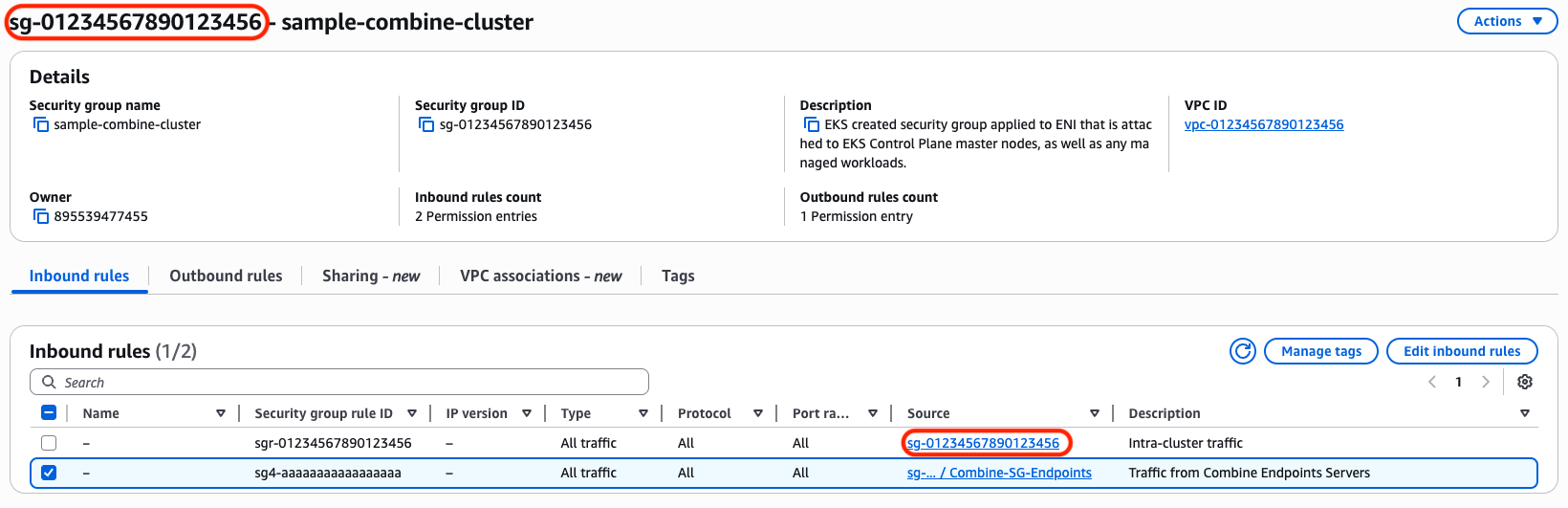
In the screenshot above, note that the 'Source' of the EKS Cluster's Security Group's first rule references itself. You will need to add a rule patterned after the second rule above which references Combine Endpoint Server's Security Group.
Nodes Joining the Cluster
If your nodes are unable to join the cluster, you have several routes to troubleshoot:
- Your Combine Deployment may need the
EnableAirgapAccessEKSon the Combine Policy stack set totrue. This needs to be set for the nodes to communicate with the cluster's API server. The API server lives in AWS's network space, outside of the VPC, so Combine is not able to proxy that traffic over the high side endpoints. - More suggestions forthcoming.
Recommended EBS CSI Driver Configuration
Use a recent EBS CSI Driver version and ensure IMDS is reachable from pods.
Recommended setup:
- Use AWS EBS CSI Driver v1.33+ (newer versions like 1.53 are fine)
- Ensure worker nodes:
- Have IMDS enabled
- Have HTTP PUT response hop limit ≥ 2
- Ensure the CSI controller has credentials via:
- Node IAM role (IMDS), or
- IRSA (if supported and configured)
- Do not assume emulator limitations for IMDS-related errors
With this configuration, dynamic EBS-backed PersistentVolumes can be provisioned successfully in emulated EKS clusters.
PersistentVolumeClaims (PVCs) stuck in Pending when using the AWS EBS CSI Driver
Most likely, pods cannot reach the EC2 Instance Metadata Service (IMDS), preventing the EBS CSI driver from obtaining credentials. The root cause is usually an incorrect IMDS hop limit.
Detailed answer:
When deploying the AWS EBS CSI Driver in an EKS cluster running inside an emulated region:
- PVCs may remain in
Pendingwith messages like:Waiting for first consumerExternalProvisioning
- Logs may show errors such as:
GetInstanceIdentityDocumenttiming outfailed to refresh cached credentialsno EC2 IMDS role found
The specific misconfiguration in this case would be:
- IMDS HTTP PUT response hop limit set to 1
- Pods require a hop limit of at least 2 to reach IMDS from within the node network namespace
Once the hop limit is increased to 2 on the worker nodes, pods should able to access IMDS, credentials should be retrieved successfully, and PVCs should be bound as expected.
Cluster Autoscaler (and other component) AZ/Topology Rewrites
AWS Cluster Autoscaler cannot map Kubernetes nodes to their Auto Scaling Groups in a Combine environment. Combine rewrites the availability zone to ISO form in AWS API responses, but a node's spec.providerID keeps the commercial AZ, since the autoscaler pod retrieves this value from the default kubernetes domain name kubernetes.default.svc domain name, and this API call does not go through Combine. The autoscaler joins
those two values as strings, so they never match.
An example from a running cluster:
# these two commands will reproduce the az/topology mismatch
  kubectl get nodes -o custom-columns='NAME:.metadata.name,PROVIDER:.spec.providerID'

aws autoscaling describe-auto-scaling-groups \
  --auto-scaling-group-names <asg> \
  --query 'AutoScalingGroups[].[AutoScalingGroupName,Instances[].[InstanceId,AvailabilityZone]]'
In practice, this will return values like:
[ec2-user@ip-10-0-35-207 not-a-kubestronaut]$ kubectl get nodes -o custom-columns='NAME:.metadata.name,PROVIDER:.spec.providerID'
NAME                          PROVIDER
ip-10-0-36-249.ec2.internal   aws:///us-east-1c/i-0502afe1f135ab04c  💣 <-- bad cause commercial
ip-10-0-40-23.ec2.internal    aws:///us-east-1c/i-05efda15056a6f86a
[ec2-user@ip-10-0-35-207 not-a-kubestronaut]$ aws autoscaling describe-auto-scaling-groups \
  --auto-scaling-group-names \
    eks-combine-master-eks-ng-2-20260611172448052600000007-4ecf5bdb-87be-ad95-f634-b84acd83c998 \
    eks-combine-master-eks-ng-2-20260611174930015800000007-6ccf5be6-d643-7366-b9e8-871ee0cadeda \
  --query 'AutoScalingGroups[].[AutoScalingGroupName,Instances[].[InstanceId,AvailabilityZone]]'
[
  [
    "eks-combine-master-eks-ng-2-20260611172448052600000007-4ecf5bdb-87be-ad95-f634-b84acd83c998",
    [
      [
        "i-0502afe1f135ab04c",
        "us-iso-east-1c" 💣 <-- bad cause iso
      ]
    ]
  ],
  [
    "eks-combine-master-eks-ng-2-20260611174930015800000007-6ccf5be6-d643-7366-b9e8-871ee0cadeda",
    [
      [
        "i-05efda15056a6f86a",
        "us-iso-east-1c"
      ]
    ]
  ]
]
Caveat — this snippet illustrates the default rewrite, not the autoscaler's traffic. The
aws autoscalingcommand above runs under your shell identity (your role, anaws-cli/...user-agent), which is never exempted. It shows what any non-exempt caller receives, and it will keep returningus-iso-east-1ceven after the fix below is applied. Do not use it to validate the fix — see Verifying the fix. The cluster-autoscaler itself never shells out toaws; it uses the AWS Go SDK under its own IRSA role andcluster-autoscaleruser-agent, and only that traffic is exempted.
The fix is to disable the autoscaling availability-zone response rewriter for the cluster-autoscaler, so its DescribeAutoScalingGroups responses pass through with the commercial AZ intact and match the node's spec.providerID.
This is done with two config values in DynamoDB, which scope the exemption by the caller's assumed-role ARN and by the caller's user-agent respectively:
combine.endpoints.aws.rewriter.response.autoscaling.availabilityZone.enable.roleArn.contains.except=cluster-autoscaler
combine.endpoints.aws.rewriter.response.autoscaling.availabilityZone.enable.userAgents.except=cluster-autoscaler
Each value is a space-separated list, matched as a substring (case-sensitive) against the corresponding request attribute. A request skips the autoscaling AZ rewrite if either:
- its assumed-role ARN contains a listed value (e.g.
arn:aws:sts::<account>:assumed-role/PROJECT_cluster-autoscaler/...containscluster-autoscaler), or - its
user-agentheader contains a listed value (e.g.aws-sdk-go-v2/... cluster-autoscaler/1.35.0 ...containscluster-autoscaler).
The two knobs are independent scopes: role-ARN catches the autoscaler's identity regardless of user-agent, and user-agent catches the autoscaler's requests regardless of role. For the cluster-autoscaler both are true, so setting both gives a belt-and-suspenders exemption.
Note: These config values are not the request-side
combine.endpoints.aws.rewriter.request.strictMode.userAgents.except. That property only controls request-side strict-mode validation and has no effect on whether response availability zones are rewritten — a request carrying thecluster-autoscaleruser-agent will still have its response AZs rewritten to ISO form unless one of theresponse.autoscaling.availabilityZone.enable.*.exceptkeys above matches.
This targeted exemption, at the cost of pure always-on emulation for the cluster-autoscaler, allows the autoscaler to map nodes to their Auto Scaling Groups as expected. It is scoped to the autoscaler only; all other clients in the environment continue to receive emulated ISO availability zones.
Verifying the fix
Do not validate with a manual aws autoscaling call — as noted above, that identity is never exempted and will still return us-iso-east-1c. Validate against the autoscaler's own Combine transaction instead. The autoscaler issues its tag-filtered DescribeAutoScalingGroups automatically on its scan interval (~10s), so a fresh transaction appears on its own; to force one immediately, restart it:
kubectl rollout restart deployment/cluster-autoscaler -n kube-system
Then find that transaction in Combine's logs. Confirm it is the autoscaler's by its identity:
- user-agent contains
cluster-autoscaler/...(e.g.aws-sdk-go-v2/... cluster-autoscaler/1.35.0 ...) - roleArn contains
...assumed-role/PROJECT_cluster-autoscaler/... - parameters show
Action=DescribeAutoScalingGroupswith thek8s.io/cluster-autoscaler/enabledtag filter
Two signals in that transaction confirm the exemption fired:
-
The AZ rewriter is skipped. Combine logs a
Response Rewriting : Body : Applying Rewriter [...]line for each rewriter it runs. When the exemption is working,ApiResponseRewriterAutoscalingAvailabilityZoneis absent from that list (you will still seeApiResponseRewriterAutoscalingArn, which is a separate rewriter and intentionally left enabled). -
The client-facing response carries commercial AZs. Compare the two response sections in the transaction:
responseProxy(the raw reply from AWS) andresponse(what Combine returns to the autoscaler). With the exemption active,responseshowsus-east-1c/us-east-1a,b,c— matchingresponseProxy— instead of the rewrittenus-iso-east-1c.
If Combine is running at VERBOSE log level you will also see API Handler [...ApiResponseRewriterAutoscalingAvailabilityZone] is disabled for ..., but that line is log-level dependent; the two signals above are the reliable check.
If a fresh autoscaler transaction still shows us-iso-east-1c and the AZ rewriter still appears in the "Applying Rewriter" list, the config did not reach the handler — check that the DynamoDB value is set at the correct environment/partition scope and has propagated, rather than looking for a logic error.
Additional Considerations
- We recommend using IaC (Infrastructure as Code) to provision your EKS Cluster(s). ClickOps has been shown to not be reliably reproducible. There are AWS Console offerings in the AWS and AWS GovClud partitions which are not present in the emulated regions.
- We recommend using version 1.33 or greater of the AWS EBS CSI driver.
- On EC2 instances, including EKS worker nodes, there is a setting on the instance metadata options called
HTTP PUT response hop limit. This controls how many network hops a response from the EC2 Instance Metadata Service (IMDS) is allowed to take..It needs to be set to at least2. More information on the AWS docs here. - Note that Combine does not fully support EKS clusters provisioned with the terraform AWS EKS module version 21.3.1. We anticipate supporting this very soon!
- The Helm Chart for some Plugins may need to be modified, particularly for AWS commercial ARNs, regions, and availability zones.
- Your Combine instance must have Permissions Boundaries and IAM Self Service enabled. If you are not sure if this is enabled on your account, please reach out to a Combine Team member via email.
- You must prefix all roles that do EKS-related work (node groups, pods, clusters) with
PROJECT_as per the customer's high side requirement. Combine will not allow creation of roles that do not follow this format.
Please see this page for more information on how to configure EKS add-ons.
For a complete working example of how to stand up an EKS cluster within Combine, please see our example repository.