Architecture
This Combine Network Architecture is used when your workload must span multiple VPCs (and even multiple AWS Accounts) at a very very large scale.
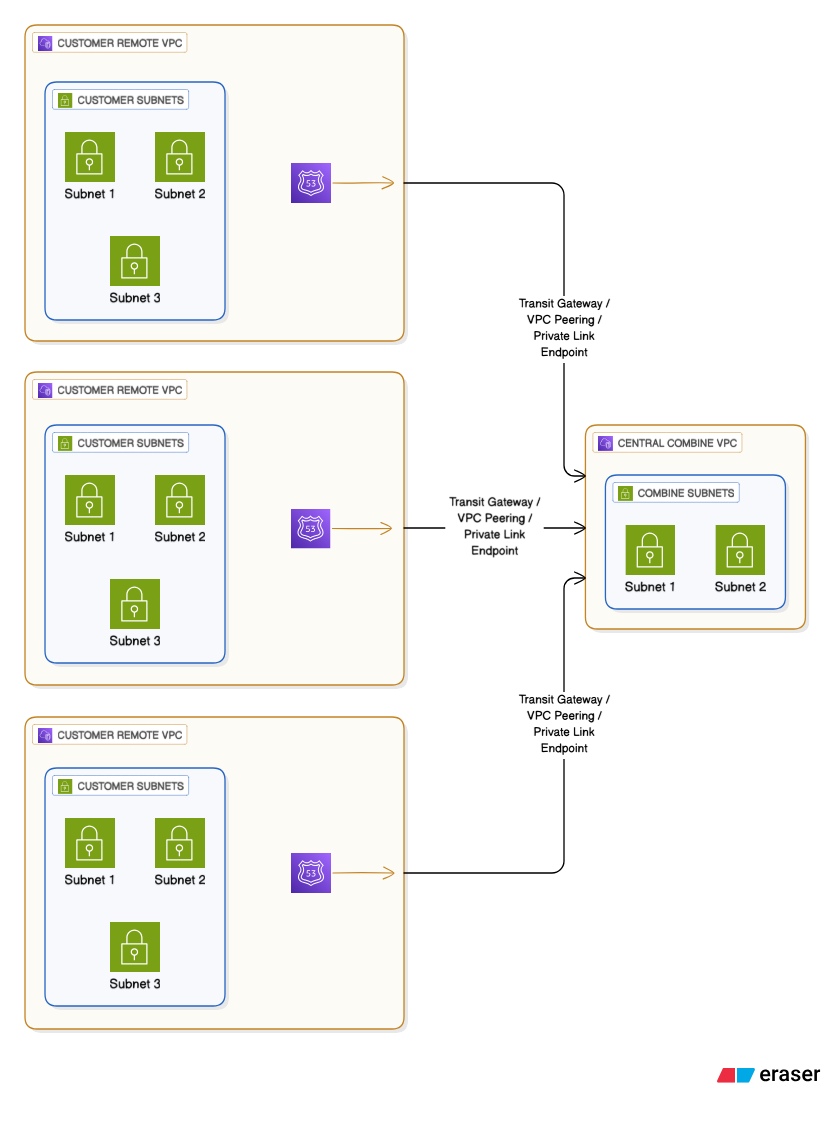
In this architecture Combine is deployed to a single VPC. Your workload is deployed to separate VPCs. Route 53 Private DNS entries redirect all emulated endpoint traffic to the Combine VPC through a VPC interconnect.
Architecture Diagram
Advantages
- This architecture is very very scalable. (The Combine Support Team has supported up to 200 AWS Accounts attached to a single Combine instance.)
- This architecture is cost effective for large workloads.
Disadvantages
- This architecture cannot proxy EKS Cluster traffic unless each EKS Cluster has a public API Endpoint.
- This architecture is complex and requires shared responsibilities between you and the Combine Support Team.
Shared Responsibilities
- You must create/maintain the VPC interconnect.
- You must deploy a Combine Policy template to each AWS Account that is "linked" to the Combine account.
- You must deploy a Route 53 Private Hosted Zone that directs traffic to Combine through the VPC interconnect.
Supported VPC Interconnects
Combine supports several different VPC interconnects to allow traffic to move from the Workload VPCs to the Combine VPC:
- VPC Peering - This also requires you to create/maintain additional route tables within the Combine VPC.
- Transit Gateway - This also requires you to create/maintain additional route tables within the Combine VPC.
- PrivateLink - Combine can expose an AWS PrivateLink services for all emulated endpoints. A Workload VPC can instantiate a AWS PrivateLink VPC Endpoint to communicate with Combine. NOTE: This does not provide AirGap emulation to the Workload VPC.
- Public Load Balancer - Combine can expose a public load balancer that allows access to emulated endpoints. NOTE: This is not recommended.