VPC Network Architecture
Each Combine VPC emulates a specific Region of your production environment, based on the Region it is hosted in.
This page describes the network architecture of an individual Combine VPC. For how one or more Combine VPCs work together in a topology to provide emulation for your entire workload, see Network Topology.
Combine VPC Architecture
Each Combine VPC has three basic functions:
- Emulate AirGap Networking
- Emulate AWS API Endpoints
- Emulate API Endpoints (such as CAP/SCAP)
AirGap Networking
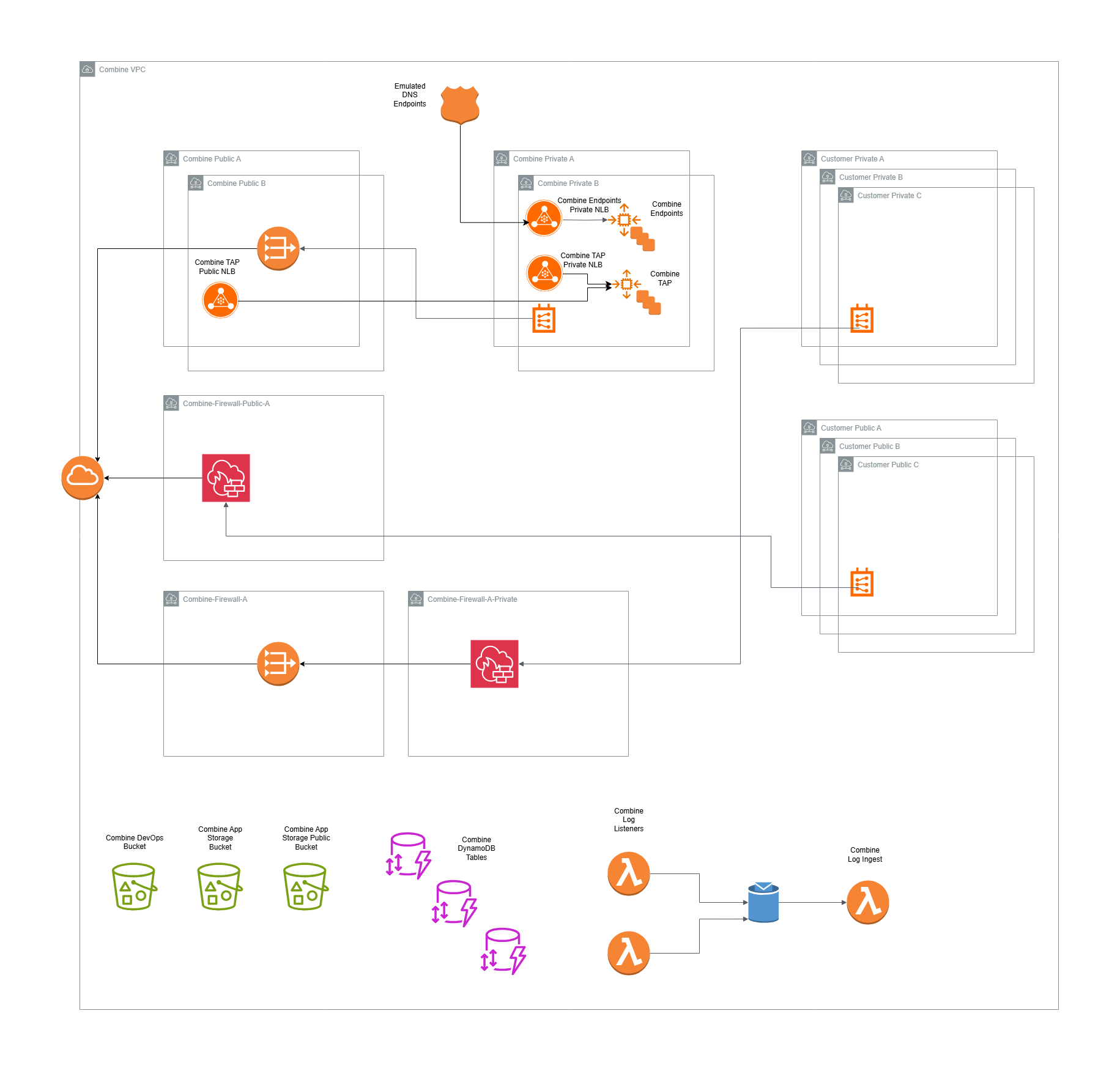
Combine routes network egress for each workload subnet through a Route Table to the appropriate Combine Firewall. The Combine Firewall has a rule set that controls which traffic is allowed to egress. To change that rule set, see Configure AirGap Layer.
For your convenience, Combine can create default workload subnets that are already configured correctly. If you create your own subnets, configure each subnet to use the appropriate Combine Route Table so that Combine controls its egress.
Emulated AWS Service Endpoints
Combine uses a Route 53 Private Hosted Zone to implement the DNS for each emulated AWS Service Endpoint. The Private Hosted Zone routes traffic to an internal Combine Load Balancer for the Endpoint Servers, which proxy AWS API calls to and from the host Region and Partition. For how this proxying works, see Rewriting.
Emulated API Endpoints
Combine uses a Route 53 Private Hosted Zone to implement the DNS for each emulated API Endpoint. The Private Hosted Zone routes traffic to an internal Combine Load Balancer for the TAP Servers, which host these emulated API services.
Internal Architecture
Each Combine VPC is configured with at least a pair of /24 CIDR Blocks. By default, these are 10.0.255.0/24 for the Combine Subnets and 10.0.254.0/24 for the Combine Firewall Subnets, within a default VPC CIDR Block of 10.0.0.0/16. Combine divides these CIDR Blocks into several groups of subnets:
| Subnet Group | Purpose |
|---|---|
| Combine Private Subnets | The Combine TAP Servers and Endpoint Servers, and their Load Balancers. |
| Combine Public Subnets | The Combine TAP Public Load Balancer and the Combine NAT Gateway. Before Combine 3.14.0, these also housed the Combine Bastion server. |
| Combine Private Firewall Subnets | The Private Combine Firewall, which controls egress for private subnets. |
| Combine Public Firewall Subnets | The Public Combine Firewall, which controls egress for public subnets. |
Internal Architecture Diagram
Wrapping an Existing VPC
By default, each Combine VPC CloudFormation Stack builds a new VPC. Combine can instead "wrap" a VPC that already exists, for example when your account does not permit Combine to create network resources, or when your workload already runs in an established VPC. Combine then adds its resources to the existing VPC, and the architecture described above otherwise stays the same.
See VPC Wrapping for what Combine builds in a wrapped VPC, what you must configure yourself, and the parameters that configure it.
Questions
If you have any questions, contact the Combine Support Team.